Church API v3

MACCH Attendance System

Church API v3
Progress tracker

Follow the work behind the church’s attendance system, from the service that saves records to the screens youth leaders will use.

Explore the workstreams

Development status

Two sides of the build

The frontend is what leaders use. The backend checks what they can do and keeps the records.

Core code merged

Backend

The service that checks permissions, stores attendance and supports reporting.

People, groups and sessions

Each person can belong to one standing group or be unassigned. Leaders enroll people in events explicitly. Attendance belongs to a dated session of an event.

Attendance and follow-up

The API supports session rosters, recording and correcting attendance, and scoped summaries for the dashboard. The roster distinguishes present, absent and unmarked. Safe retries help prevent repeat submissions from creating duplicate changes.

Permissions and audit history

People and connected apps need permission for the action and access to the relevant record. A denial on a particular record takes priority. Audit history records changes in a linked sequence that can be checked for tampering.

File sharing and uploads

Approved users can upload files directly to private storage. The November 20 change lets the portal renew an upload form within its allowed window. The API verifies the file before marking it ready. The configured storage provider still needs a staging check.

Service monitoring

The backend sends operational logs and metrics through OpenTelemetry. Operators can use Grafana to inspect service behavior. The hosted monitoring setup still needs verification.

105 API actions · 64 paths

Counted in the November 20 API contract. The file-upload merge reports 477 tests passed using disposable PostgreSQL, Redis and S3-compatible storage.

Integration pending

Frontend

The browser portal where youth leaders find a session, open a roster and record attendance.

What exists today

The existing Next.js portal has screens for youth sessions, students, groups, events and attendance. Its repository describes responsive navigation and browser checks with simulated API responses. Connecting the portal to v3 is the next delivery step.

Refresh how the portal talks to v3

Choose the API revision for staging, update the portal’s API client and refresh its example data. Recheck how the interface responds when a user’s access changes or a page needs to reload after a filter changes.

Prove the leader workflow

Sign in, see a dashboard limited to the leader’s access, pick an authorized session, open the roster, then mark and correct attendance. Verify empty lists, denied access, and retry behavior.

Connect the rest of the planned screens

The v3 design covers a people directory, event and session management, follow-up, account settings, file handling and administration. Available screens and actions depend on the role and the staging scope.

Check usability with real staging roles

Try the workflow on phones and desktop browsers, with keyboard navigation and clear loading, error and confirmation states. Use representative staging roles to verify what each leader can see and change.

First acceptance milestone

A representative youth leader completes the agreed attendance workflow against the v3 staging service.
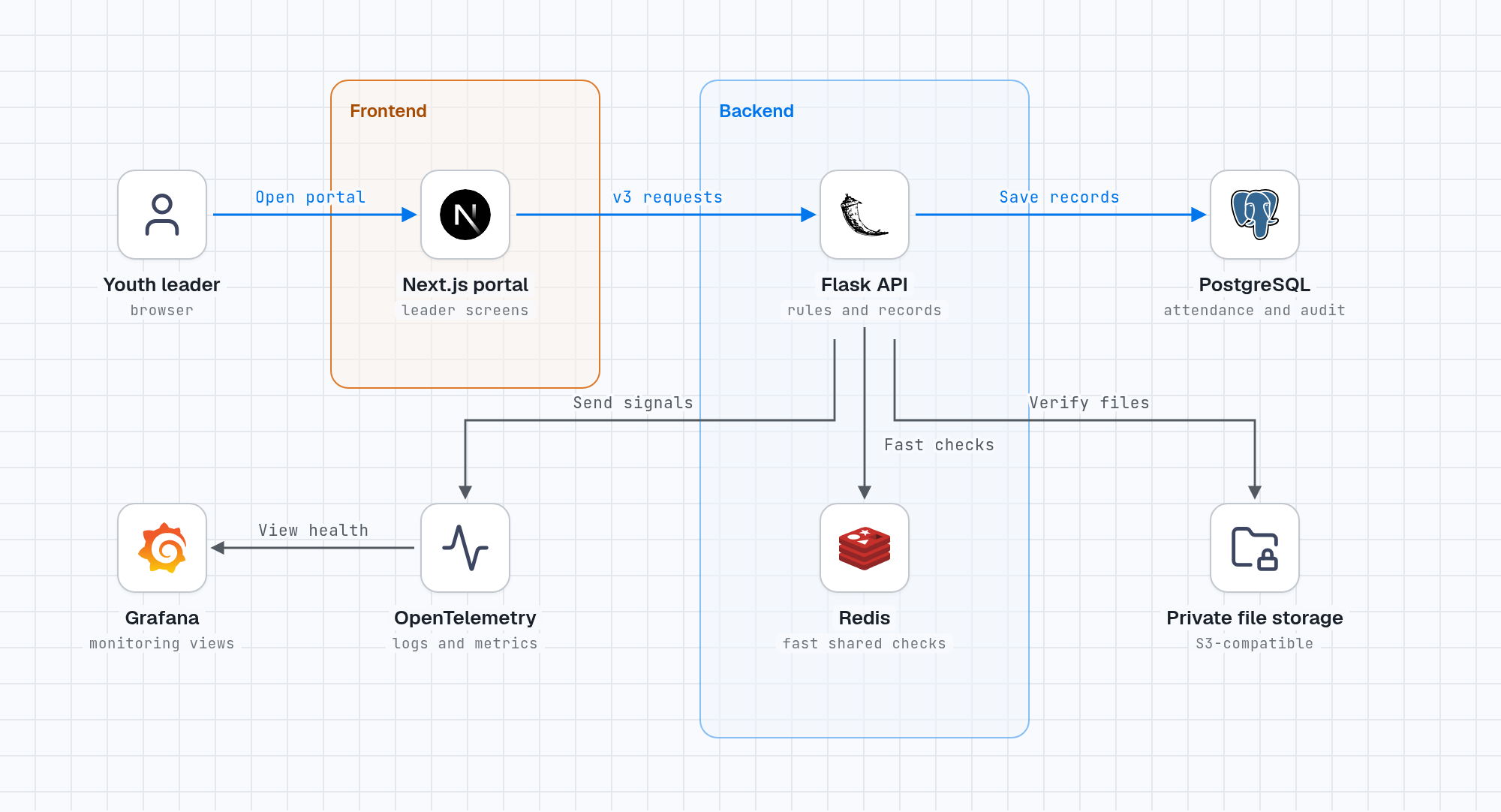
System overview

How an attendance mark gets saved

The diagram shows the planned v3 connection between the portal and the backend.

Youth leader uses the Next.js portal. The portal sends requests to the Flask API, which saves records to PostgreSQL and uses Redis, private file storage and an OpenTelemetry collector.
Open full-size diagram

Open a session

A leader signs in and picks a dated session in the portal.

Check access

The API checks the leader’s current permissions before showing the roster or accepting a change.

Save the change

The service stores the attendance record in PostgreSQL and sends a result back to the portal.

Delivery roadmap

What happens next

Staging is a rehearsal environment. A release depends on the agreed workflow passing there. A release date has yet to be confirmed.

  1. Agree the staging scope

    Choose which leader roles and actions the first demo must cover. Decide whether any of the additional features below are release requirements.

    Decision needed
  2. Update the portal and connect the core flow

    Pin the API contract, prepare representative data and connect sign-in through attendance correction.

    Planned
  3. Test the staging candidate

    Verify each role’s access, attendance retries, file upload and download, link revocation, and hosted monitoring.

    Verification pending
  4. Get sign-off and prepare for production

    Demonstrate the agreed scenarios, check recovery and rollback, then confirm the deployed release with a short end-to-end check.

    After staging

Additional features and decisions

Public event pages

Decide who can publish events and which media visitors may see. Then build draft, publish and unpublish flows and verify what visitors can access.

Attendance exports

Approve who can request and receive exports, then build background generation and delivery with a fresh access check.

Recurring sessions

Agree how often to generate sessions in advance and how to handle time zones and daylight-saving changes without duplicate sessions.

Automatic attendance finalization

Decide when to capture the expected roster and how to close sessions with no end time. Preserve marks and allow authorized corrections.

Audit history retention

Decide how long records are kept and how to verify the retained history after older records expire.

Temporary file cleanup

Implement shorter, targeted cleanup for abandoned uploads and verify that published files are preserved.

Project history

Recent updates

Follow recent code merges and planning updates. The release roadmap tracks deployment and acceptance.

  1. Renewable uploads merged

    Updated how the portal can renew file uploads and how verified files are marked ready. The contract now lists 105 actions.

  2. Permissions and audit history merged

    Unified access rules for users and apps, and added a verifiable audit history.

  3. Frontend delivery baseline recorded

    Notion identifies the youth-leader workflow as the first v3 integration and captures the screen plans and staging checklist.

  4. Operational monitoring merged

    Added a pipeline that sends service logs and metrics to monitoring tools.

  5. Reusable groups merged

    Standing groups and event enrollment can be managed independently.